Off the grid, still one text from Claude.

Uplink turns an iMessage, even one sent over satellite with no data, into an agent run on your Mac, and texts the answer back.

From $1.99 a month. Signed and notarized. macOS 13+.

A text crossing the sky A globe made of dots. A message leaves an iPhone in the Utah desert, climbs to a satellite, crosses to a second satellite, and comes down at a Mac on the East Coast. The reply travels back the same way.
your text the answer no cell, no Wi-Fi

Two real texts, answered.

Replies from September 27, 2026, exactly as Uplink sends them: plain text, marked with a satellite.

When will the padres play on Thursday? And what's the nfl scores today?

🛰 Padres: no regular-season game this Thursday - they clinched a playoff spot and are in the NL Wild Card Series vs the Cubs; Game 3 (if needed) is set for Thursday Oct 1, time TBA. NFL today (Sun 9/27) early games: Steelers 30, Bengals 27; Lions 31, Jets 24; Jaguars 35, Patriots 6; Bills 24, Chargers 16; Browns 21, Panthers 18. More games still to kick off later today.

Two web searches, 14 seconds.

What changed in ~/Code/stacks today? Three short lines.

🛰 Today: fixed CMS article images (Medium-style publish + stx script left alone), tightened typecheck so @stacksjs subpaths resolve to source not stale dist, fixed noUncheckedIndexedAccess in image reader, and cut releases v0.75.7 and v0.75.8.

Ran git log inside the repo, 14 seconds.

How it works

From a text to an agent session, and back.

Your Mac reads the message, does the work and answers through Messages. The agent sends your prompt to Anthropic or OpenAI under your own account, and nothing else leaves.

  1. Text

    Message yourself from your iPhone. iMessage over satellite needs no cell or Wi-Fi signal.

  2. Read

    Uplink watches the Messages database on your Mac and picks up texts from handles you allow.

  3. Run

    Claude Code or Codex runs headless on the plan you already have, inside the repository your text names.

  4. Reply

    The answer comes back as plain text, split into at most three messages.

Built for a thin link and a real machine.

The Milky Way above a band of orange airglow, photographed from the International Space Station

Short answers, few texts.

Plain text, no markdown. A long reply is split into three texts, and the rest waits until you send more.

Works inside your repos

Name a path and the run starts there, with that repository's agent instructions, hooks and settings, CLAUDE.md or AGENTS.md. Follow-ups continue the session.

Five words it always answers

status
what it is working on
stop
cancel the task and the queue
new
start a fresh conversation
more
the rest of a long reply
ping
check it is alive
claude / codex
switch that thread to that agent

Nobody else can use it

Only one-to-one chats with handles you allow. Group chats are ignored, and only Uplink.app gets Full Disk Access, not your terminal. What a text can do.

Before you install it

A text runs a real agent, unattended.

That is the product, and it is worth knowing before you point it at a Mac that matters.

What a text can do

  • Approvals are off

    Nobody is at the Mac to answer a prompt, so there are none. Claude Code runs with bypassPermissions, Codex with bypass.

  • It can read, write and run

    Inside the directory your text names, with your permissions. The same authority you have at a terminal on that Mac.

  • So your phone is the key

    An unlocked phone with access to the allowed thread can command your Mac. Treat the allow list the way you treat an SSH key.

What cannot reach it

  • iMessage only

    SMS is refused outright. A forwarded SMS sender id can be spoofed through a bulk gateway, and the other side of that door is an agent with approvals off.

  • One to one only

    A group chat never reaches it, whoever is in it.

  • Handles you allow

    Empty means this Mac's own Messages handles, so a default install answers only you.

  • Nothing stale

    A text older than the catch-up window is not run, so a Mac waking up cannot replay a day of instructions.

Your prompt and whatever the agent reads go to Anthropic or OpenAI under your own account. Your texts go through Apple, as any iMessage does. A licence check reaches uplink.stacksjs.com every six hours and sends the key, nothing else. The whole of it is on the privacy page.

Download Uplink for Mac.

A menubar app. Uplink takes care of the rest.

  • An Apple Silicon Mac M1 or later. The app is arm64 only.
  • macOS 13 or later Signed and notarized, so it opens like any other app.
  • Claude Code or Codex On the plan you already have, Claude or ChatGPT. No API key.
  • Full Disk Access Only for Uplink, so it can read Messages. Not for your terminal.
  • Permission to control Messages Asked once, so it can text the answer back.
  • A Mac that stays awake A laptop with its lid closed sleeps unless it is on power with a display attached.

Texting yourself over satellite depends on how your iPhone routes a message to your own number, so try it once before you rely on it.

Download for Mac

Version 0.1.4, 35 MB

Open source, MIT licensed. Every release is listed on GitHub.

  1. Install

    Open the download and drag Uplink to Applications. It is signed and notarized by Apple, so it opens like any other app.

  2. Say yes three times

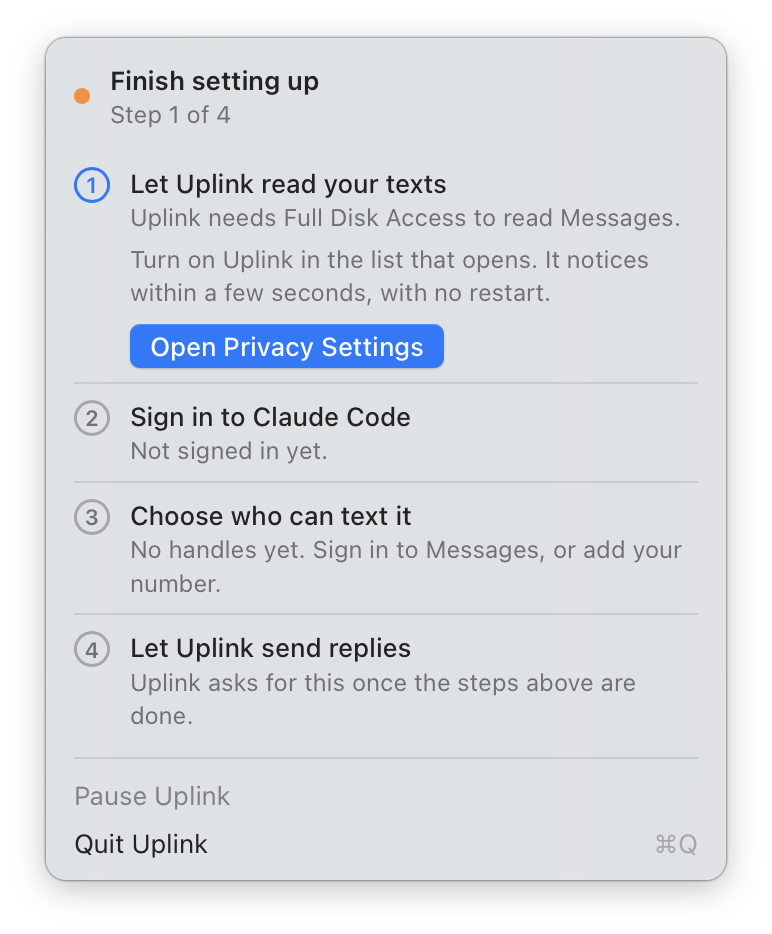
    Uplink sets itself up. It opens the one switch in System Settings it needs, signs in to the agent you chose, and asks once to use Messages. It finds your numbers by itself.

  3. Text it

    Send yourself "ping" from your iPhone. The answer starts with a satellite.

Rather build it yourself? Build it from source.

Uplink's menubar popover on first launch: four setup steps, starting with letting Uplink read your texts

Questions

Does texting yourself work over satellite?

It depends on how your iPhone routes a message to your own number, so try it once before you rely on it. If it does not arrive, sign the Mac into a second Apple ID and text that instead.

Why does it need Full Disk Access?

Messages keeps your texts in a database macOS protects. Uplink reads it to notice texts from the handles you allow, and ignores every other conversation.

Do I need an API key?

No. Uplink runs the CLI you already pay for: Claude Code on a Claude plan, which signs in through your browser and keeps its token in your Keychain, or Codex on a ChatGPT plan, which keeps its own credentials and leaves Uplink holding nothing.

What can it do on my Mac?

Anything the agent can: search the web, read and edit files, run your tests. That is why only one-to-one chats with handles you allow can reach it.

What does it cost?

$1.99 a month, $19.99 a year, or $29.99 once. That is for Uplink itself; the answers run on the plan you already have, Claude or ChatGPT, and nothing is charged per text.

Can it answer with ChatGPT instead?

Yes. Choose Codex in the menubar and Uplink answers with your ChatGPT plan instead of Claude. Everything else works the same way.

What happens while my Mac sleeps?

Nothing, so Uplink keeps it from idle-sleeping while it runs. A laptop with its lid closed still sleeps unless it is on power with a display attached.